ShopDreamUp AI ArtDreamUp
Deviation Actions

Tip Jar
Support my work by contributing to my tip jar. This tier won't include any specific perks, but you will receive my appreciation, and I am sure occasionally extra stock
$1/month


Suggested Deviants


Suggested Collections


You Might Like…
![[Obsolete] Classic Gallery CSS](https://images-wixmp-ed30a86b8c4ca887773594c2.wixmp.com/i/3722815d-027a-435d-877d-5f84e00ba95f/d1ndqox-640d8cc1-70ee-4e79-8ba1-1efaa7cfd71f.jpg/v1/crop/w_184,h_184,x_0,y_0,scl_0.184,q_70,strp/_obsolete__classic_gallery_css_by_boffinbrain_d1ndqox-92s-2x.jpg)
![[Obsolete] Classic Gallery CSS](https://images-wixmp-ed30a86b8c4ca887773594c2.wixmp.com/i/3722815d-027a-435d-877d-5f84e00ba95f/d1ndqox-640d8cc1-70ee-4e79-8ba1-1efaa7cfd71f.jpg/v1/crop/w_92,h_92,x_0,y_0,scl_0.092,q_70,strp/_obsolete__classic_gallery_css_by_boffinbrain_d1ndqox-92s.jpg)


Featured in Groups



Description
=========================================
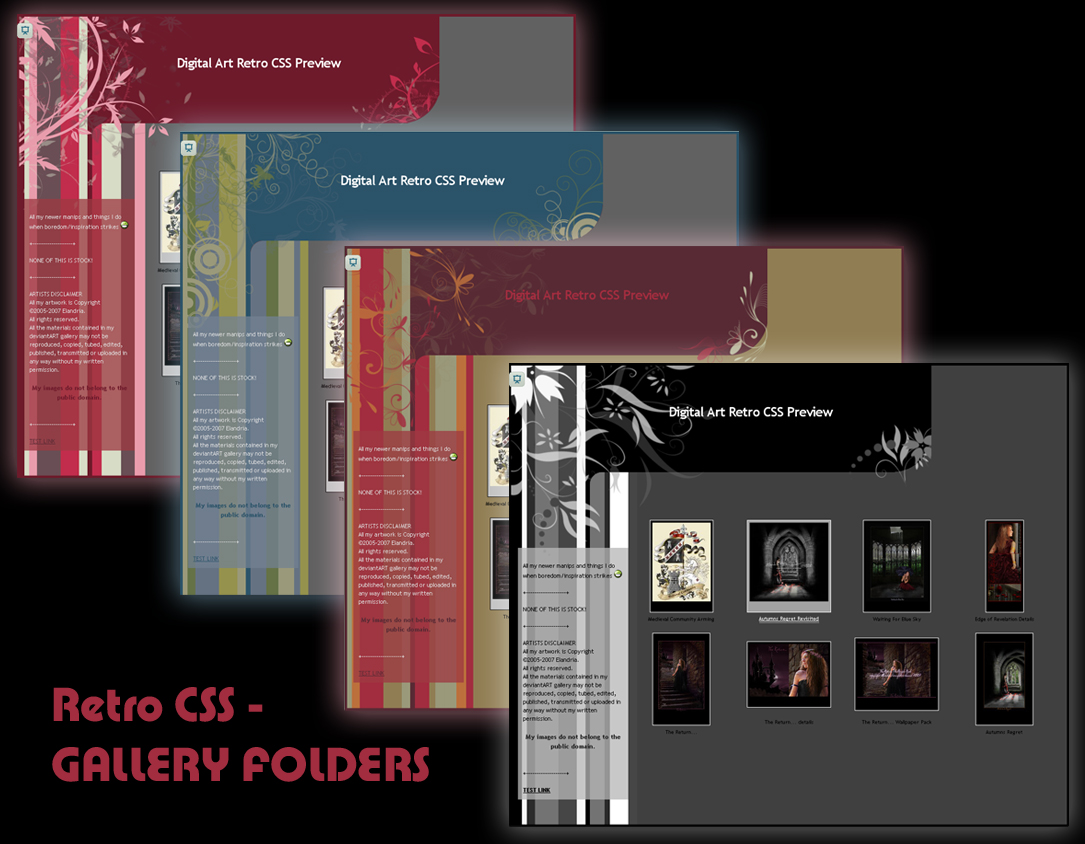
THIS CSS DESIGN IS FREE FOR ALL SUBSCRIBED DA MEMBERS TO USE
=========================================
====WORKING EXAMPLES====
 YOU CAN SEE A WORKING VERSION OF THE CIRCLES STYLE HERE IN ONE OF MY GALLERY FOLDERS
ZIP FILE INCLUDES ALL 4 COLOUR SCHEMES AS PER THE JOURNAL CSS VERSION HERE
====THE IMPORTANT BITS CHANGE LOG !====
Sept 2013
 YES you may replace the images with your own designs, HOWEVER PLEASE LEAVE MY CREDIT IN THE DESCRIPTION!!!!!!!!! Don't even get me started on people not crediting other peoples hard work. Its just plain rude damnit, and its certainly not much to ask, and just makes you look like an asshat when I have to publicly remind you.
 All images for each of the styles is now hosted for you - you're welcome!
All you need to do is copy and paste the relevant colour/style you want for your gallery - no more editing the CSS to alter image URLS 
Dec 2013
CSS fixed after DA fiddled with the core gallery description layout. Please re-download and update your CSS files
====THE INSTRUCTIONS!====
Download zip file and extract (all files are .txt and are clearly named
Once extracted open master file and READ CAREFULLY the "RETROGALLERY_INSTRUCTIONS.txt" file.
I have endeavored to make the instructions as easy to follow as possible so that first time CSS users can understand and use this design successfully, but advanced users please take heed of requests and also follow the process
If you have any problems at all PLEASE let me know! I shall try and help a much as I can  (Baring the mentioned proviso above).
====ROLL THE CREDITS====
Many thanks to the following for their brushes -
Revo's-Circle-Tech-Brushes-08 by ~RevO-GFX
gvl - Suddenly Spring brushes by ~gvalkyrie
GVL - Vines Brushes - set 2 by ~gvalkyrie
Swirls And Flowers Brushes PS by =Coby17
Floral Photoshop Brushes 4 by ~GraphicIdentity
Flowers Brushes by ~hawksmont
Floral brushes II by ~hawksmont
====GOT A PROBLEM?====
Leave a comment and details in my forum thread here - elandria.deviantart.com/journa… and I will endeavor to help you as much as I can
THIS CSS DESIGN IS FREE FOR ALL SUBSCRIBED DA MEMBERS TO USE
=========================================
====WORKING EXAMPLES====
YOU CAN SEE A WORKING VERSION OF THE CIRCLES STYLE HERE IN ONE OF MY GALLERY FOLDERS ZIP FILE INCLUDES ALL 4 COLOUR SCHEMES AS PER THE JOURNAL CSS VERSION HERE====THE IMPORTANT BITS CHANGE LOG !====
Sept 2013
YES you may replace the images with your own designs, HOWEVER PLEASE LEAVE MY CREDIT IN THE DESCRIPTION!!!!!!!!! Don't even get me started on people not crediting other peoples hard work. Its just plain rude damnit, and its certainly not much to ask, and just makes you look like an asshat when I have to publicly remind you. All images for each of the styles is now hosted for you - you're welcome! All you need to do is copy and paste the relevant colour/style you want for your gallery - no more editing the CSS to alter image URLS Dec 2013
CSS fixed after DA fiddled with the core gallery description layout. Please re-download and update your CSS files
====THE INSTRUCTIONS!====
Download zip file and extract (all files are .txt and are clearly named Once extracted open master file and READ CAREFULLY the "RETROGALLERY_INSTRUCTIONS.txt" file. I have endeavored to make the instructions as easy to follow as possible so that first time CSS users can understand and use this design successfully, but advanced users please take heed of requests and also follow the process If you have any problems at all PLEASE let me know! I shall try and help a much as I can (Baring the mentioned proviso above).====ROLL THE CREDITS====
Many thanks to the following for their brushes -
Revo's-Circle-Tech-Brushes-08 by ~RevO-GFX
gvl - Suddenly Spring brushes by ~gvalkyrie
GVL - Vines Brushes - set 2 by ~gvalkyrie
Swirls And Flowers Brushes PS by =Coby17
Floral Photoshop Brushes 4 by ~GraphicIdentity
Flowers Brushes by ~hawksmont
Floral brushes II by ~hawksmont
====GOT A PROBLEM?====
Leave a comment and details in my forum thread here - elandria.deviantart.com/journa… and I will endeavor to help you as much as I can
© 2008 - 2024 Elandria
Comments500
Join the community to add your comment. Already a deviant? Log In

using these thank you so much ^_^